Voice channels
Give your agents a real phone number they answer and can call out from, and finish the setup on the phone provider's side.
On this page
A voice channel is a real phone number your agents answer, and can call out from. Callers talk normally and the agent talks back, holding the conversation in real time rather than reading a menu at them.
Where to find it
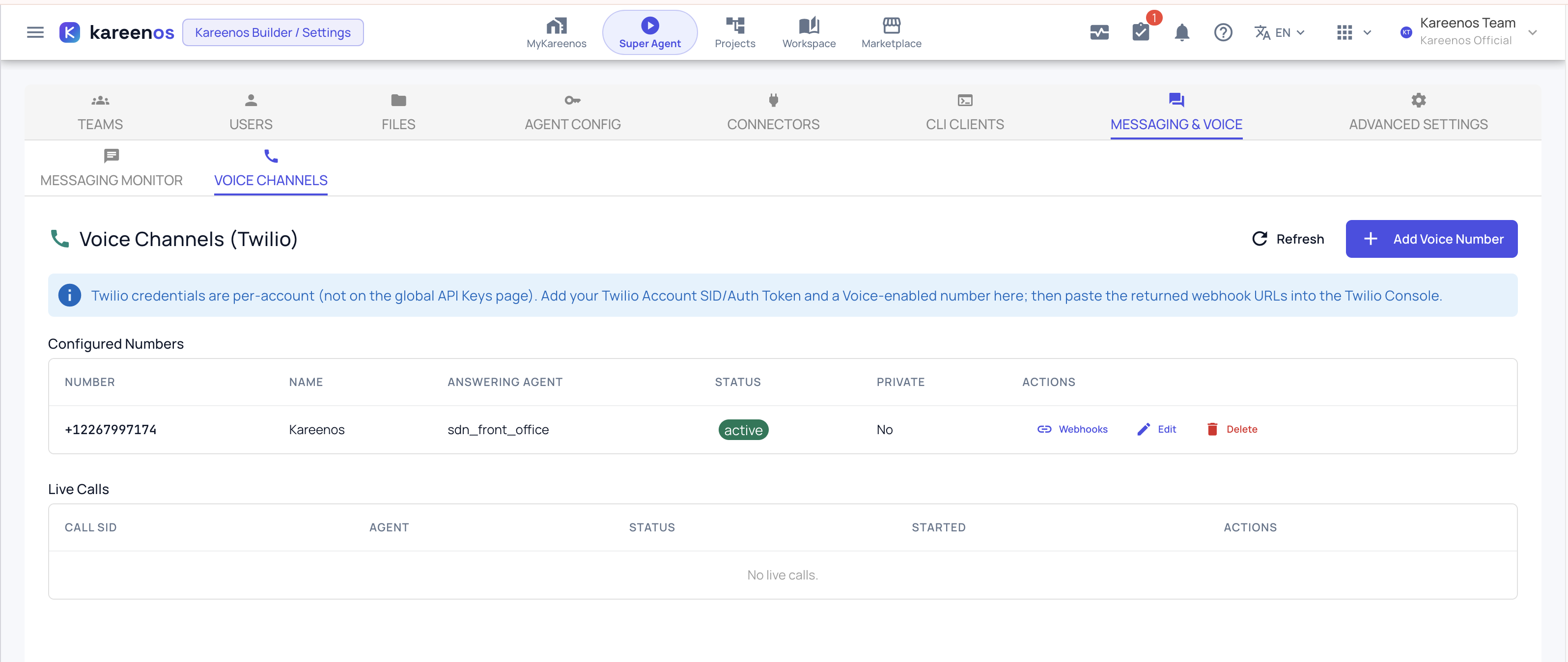
Press Open in Kareenos above, or open the avatar menu, choose Settings, then the Messaging & Voice tab and its Voice Channels sub-tab. Administrators only.
Before you start
You need a Twilio account with a phone number that has Voice enabled. Buy the number in the Twilio console first, because the rest of this assumes you have one.
Your Twilio credentials are entered here, per account, and are not shared with anything else.
Step by step: setting up a number in Kareenos
Open Voice Channels and press Add Voice Number. The Configure Twilio Voice panel opens on the right.
Enter the Voice number in full international form, including the country code. Spaces and brackets are ignored.
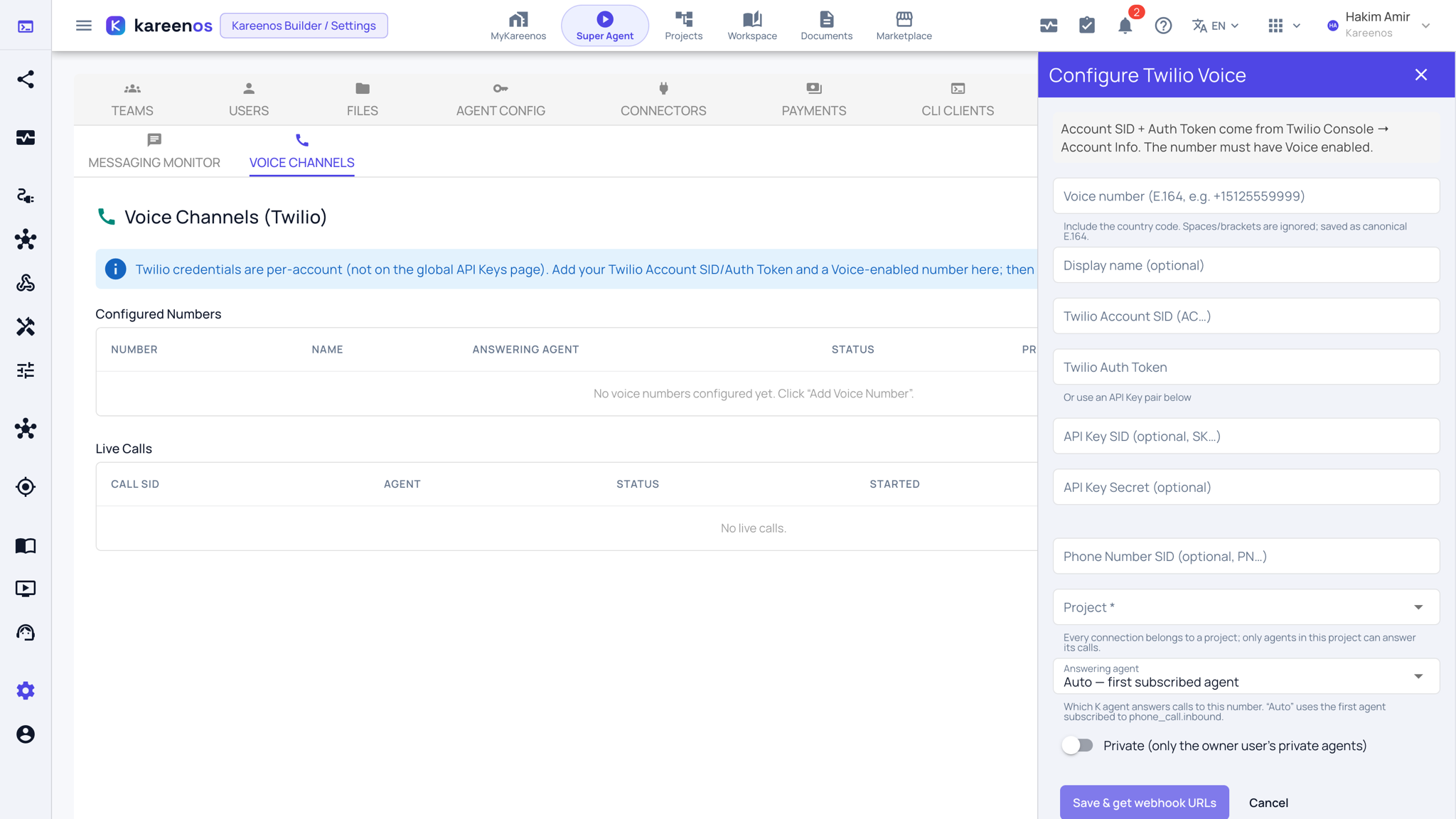
Give it a Display name so you can tell your numbers apart later.
Enter the Twilio Account SID and Twilio Auth Token, both from Twilio's console under Account Info. If you prefer not to use the account level token, you can instead supply an API Key SID and API Key Secret pair. The Phone Number SID is optional.
Choose the Project. Only agents in that project can answer calls to this number.
Choose the Answering agent. Leave it on Auto to let the first agent that is set up for incoming calls take them, or pick one explicitly. Picking one explicitly is clearer once you have more than one agent that could answer.
Set the privacy toggle the same way as a messaging channel.
Press Save and get webhook URLs.
Finishing the setup in Twilio
Saving gives you two web addresses under the heading Paste these into Twilio Console. They are the part of the setup that lives on Twilio's side, and they have to be copied across by hand.
- Copy the first address, the one for incoming calls.
- In the Twilio console open Phone Numbers, then your number, then its Voice configuration.
- Set A call comes in to that address, with the method set to HTTP POST.
- Copy the second address, the one for call status, and set Call status changes to it, also as HTTP POST.
- Save in Twilio, then call the number from your own phone.
You can reopen these at any time by pressing Webhooks on the number's row. Copy them from there rather than writing them down.
Twilio's own page on this: Voice webhooks.
Careful
These addresses live in Twilio's configuration, not in Kareenos, so nothing on this page can tell you they are wrong. If they are missing or out of date, every call fails with Twilio's own generic apology while the number still shows as active here and every part of Kareenos looks perfectly healthy. When calls stop working and nothing else changed, check Twilio's configuration first.
One thing an administrator cannot do alone
A number with correct credentials and correct webhooks still needs an agent set up to answer incoming calls on it. Without one, callers hear that the number is not available, and the call is recorded as having come in. If your test call is answered by that message rather than by an agent, the phone side is fine and the agent side is not. See K-Agents.
Live calls
The Live Calls table shows calls in progress: which agent is on each one, its status and when it started. End hangs up a call, which is there for the rare case where a call is stuck rather than as a normal way to finish one.
Finished calls are not shown here. To read what was said, or to work out why an agent answered the way it did, use Messaging Monitor and K-Agent Sessions.
Changing or removing a number
Edit changes anything on the number, including the answering agent. Leave the Auth Token and API Key Secret blank to keep the stored credentials, and only type in them to replace them.
Delete removes the number's configuration and its stored Twilio credentials. It does not release the number at Twilio, which you do in Twilio's own console, and it does not clean up the webhook addresses you pasted there.
Important
Voice number configuration is administrator only. If a colleague who used to manage your number can no longer find this page, that is a team permission to grant rather than a fault. See Teams and access.
Common mistakes
- Setting up the number in Kareenos and never pasting the two addresses into Twilio. The number looks configured on both sides and no call ever connects.
- Setting the webhook method to GET instead of POST.
- Buying a number without Voice enabled.
- Choosing a project that has no agent set up to answer calls.
- Deleting the number here and assuming Twilio has stopped charging for it.