Scheduled Callbacks
The queue of future wake-ups your agents have booked for themselves, and the ones that already fired.
On this page
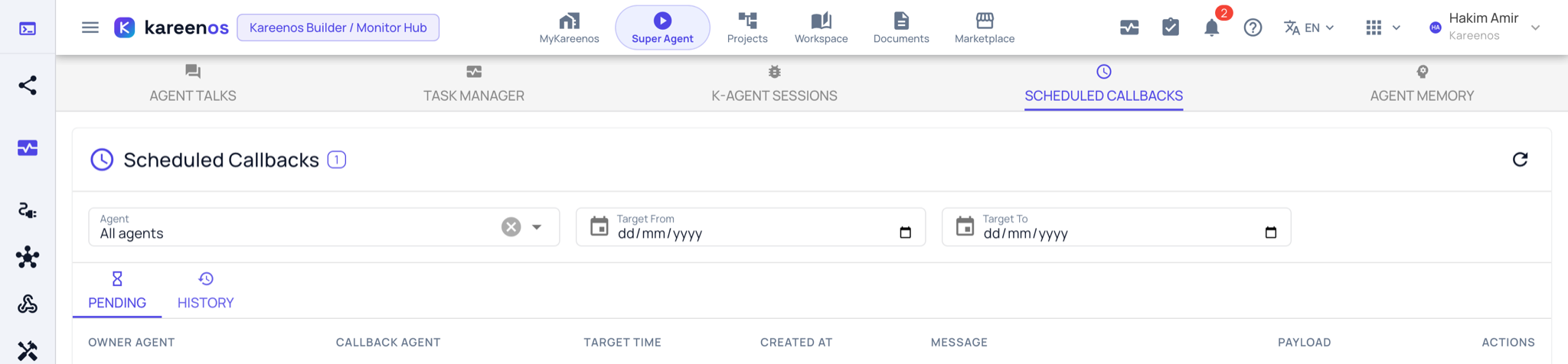
Scheduled Callbacks is the queue of future wake-ups your agents have set for themselves.
Where to find it
Open the level menu at the top of the sidebar, choose Advanced, then Scheduled Callbacks under Monitoring, or press Open in Kareenos above. Every builder can open it; cancelling a callback needs edit rights.
What a callback is
When an agent decides it needs to come back to something later, it schedules itself: check on this order in five minutes, follow up with this customer tomorrow at nine, send the weekly summary on Monday. Each wake-up carries the instruction the agent left itself and any data it needs when it resumes.
Step by step: reviewing the queue
- Open Scheduled Callbacks and start on the Pending tab.
- Read the list: every upcoming wake-up across all your agents, with its owner agent, the agent that will be woken, its target time and the message it left itself.
- Narrow with the Agent filter or the Target From and Target To dates.
- Press View on a row to read the payload attached to it.
- Press Cancel on anything that should not happen, for example a follow-up on an order the customer already cancelled.
- Switch to History to see what already fired, what was cancelled, and what expired without running.
When to look here
Look here when a promised follow-up never arrived, when a customer is being contacted more often than you expected, or after a change in your process, to clear out reminders that no longer make sense.
Note
Cancelling a wake-up stops that one occurrence. It does not stop the agent scheduling a similar one again, which is a change to the agent's instructions.
Common mistakes
- Clearing the whole Pending list to tidy up, which silently drops follow-ups customers are waiting on.
- Reading an expired entry as a failure. Some wake-ups are deliberately given a deadline after which they no longer make sense.
- Expecting scheduled automations to appear here. This page is for wake-ups agents set for themselves.