Agent Memory
Read and prune what your agents remember, both per conversation and for good.
On this page
Agent Memory lets you read what your agents remember and remove anything they should not.
Where to find it
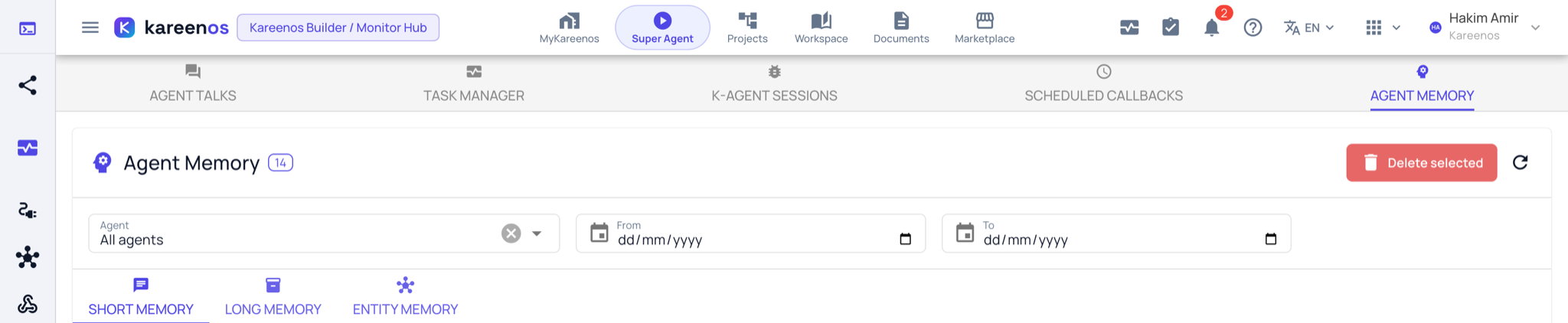
Open the level menu at the top of the sidebar, choose Advanced, then Agent Memory under Monitoring, or press Open in Kareenos above. Every builder can read it; deleting needs edit rights.
The three tiers
Short memory is per conversation. Each thread an agent is running has one entry, holding what it needs to keep the thread coherent: what the customer already said, what has been agreed, where it got to.
Long memory crosses conversations. These are durable facts the agent carries into every future conversation it has, for example a customer's delivery preference or a rule your operation follows.
Entity memory is one small record per person, team or tracked object, kept per project, that agents look up when they deal with that entity.
Step by step: reading and pruning memory
- Open Agent Memory and choose the agent in the Agent filter.
- Stay on Short Memory to see one row per conversation, each with a preview. Press View on a row to read that conversation's memory in full.
- Switch to Long Memory and read what the agent has decided to keep permanently.
- Switch to Entity Memory to read what it holds about a given person or object.
- Tick the entries that are wrong or out of date and press Delete selected.
When to prune
Prune when an agent keeps repeating something that is no longer true (an old price, a closed branch, a supplier you left), when it learned a one-off exception as a rule, or when a customer asks you to remove what you hold about them.
Careful
Deleting long memory is permanent, and the agent will behave as though it never knew that fact. Read an entry in full before removing it: a short preview rarely shows the whole reason it was kept.
Common mistakes
- Clearing short memory on a live conversation, which leaves the agent starting again mid-thread with a customer.
- Deleting the memory instead of fixing the agent's instructions, so it learns the same wrong thing again next week.
- Expecting memory to be a record of what happened. That is K-Agent Sessions; memory is only what the agent chose to carry forward.