Agent Talks
A single feed of what your agents are saying: progress narration, notes to each other and memory updates.
On this page
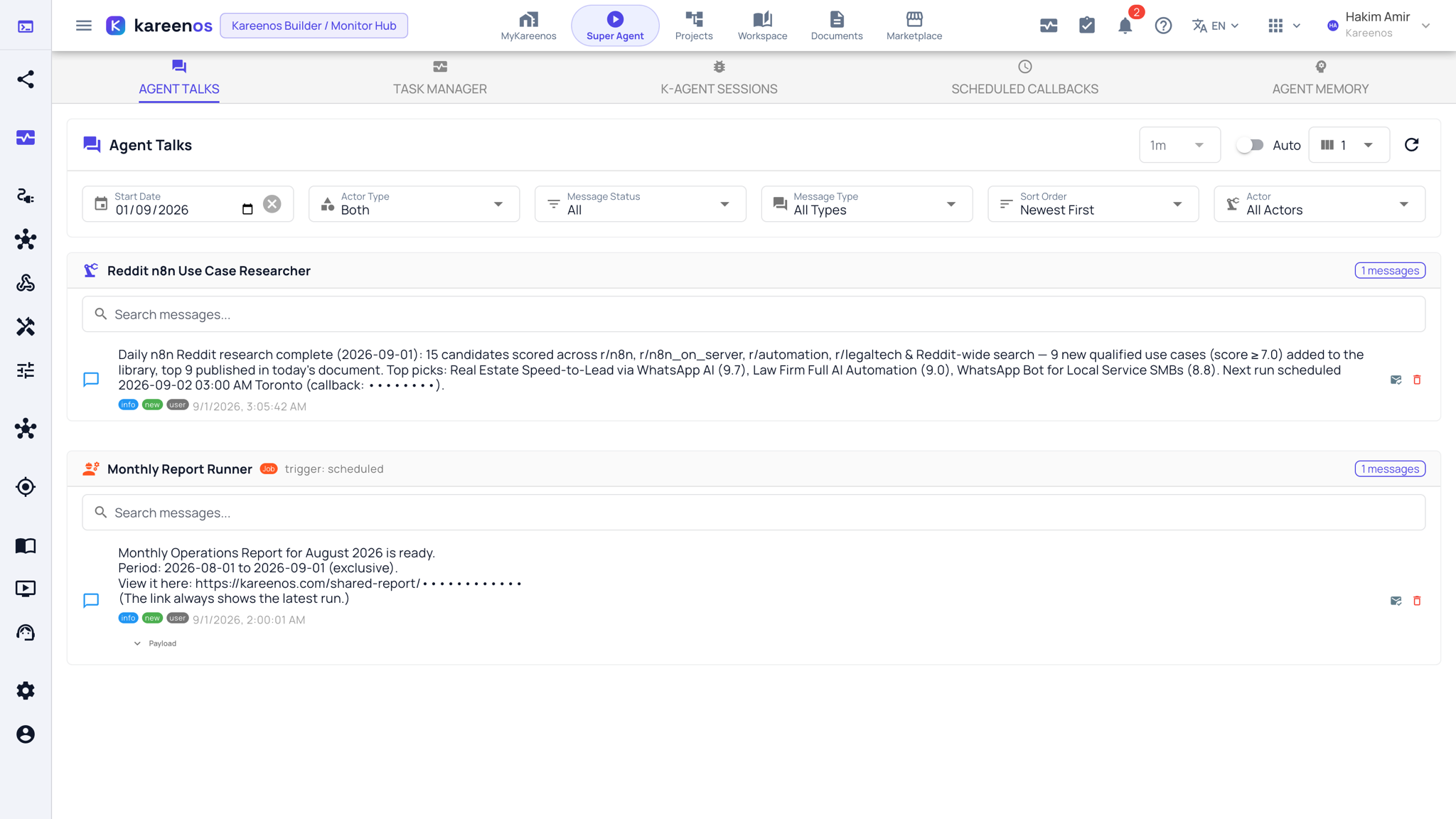
Agent Talks is a single feed of the messages your agents write while they work, so nothing happens silently.
Where to find it
Open the level menu at the top of the sidebar, choose Advanced, then Agent Talks under Monitoring, or press Open in Kareenos above. The bell at the bottom of the sidebar carries the unread count and opens the same feed. Every builder can open it.
What appears in the feed
Three kinds of message land here:
- Progress narration from long-running background work, so you can follow a build or a batch without watching it
- Notes agents leave for each other when one hands work to another
- Notifications that an agent has updated its long-term memory, meaning it has decided something is worth remembering
Together they are the audit trail for work nobody was sitting in front of.
Step by step: catching up on the feed
- Open Agent Talks, or click the bell at the bottom of the sidebar.
- Read the feed newest first. Each agent has its own group with a search box above its messages.
- Narrow with the filters: Start Date, Actor Type, Message Status (read or unread), Message Type and Actor.
- Open Payload under a message to see the data an agent attached to it, and follow one agent's group to see a whole piece of work narrated from start to finish.
- When you see a memory update you disagree with, open Agent Memory and remove it.
- Mark messages as read with the envelope button once you have caught up, or switch Auto on to refresh the feed on a timer.
Note
This is a feed of what agents said, not a to-do list. Anything that needs a person to respond arrives as an Action in the Inbox, not here.
Common mistakes
- Ignoring the bell for weeks, then trying to reconstruct a month of work from it.
- Expecting every step of a run to appear. The feed carries what agents chose to narrate; the full step-by-step record is in K-Agent Sessions.
- Reading a memory notification as a problem. Most are ordinary learning, and only the wrong ones need pruning.