What is Kareenos?
An operations platform you describe in words instead of configuring, in three levels: run your operation, see it, ship your own apps.
On this page
Kareenos is an operations platform where you describe what your business needs in your own words, and the Super Agent builds it: AI agents that work hand in hand with your team, live data sheets, automations, and the channels your customers already use.
You do not write code and you do not assemble features. You explain what your business does and what should happen, answer a short set of questions, approve the plan, and the system is built.
Three levels, one platform
Kareenos is organised in three levels. You move between them with the level menu at the top of the sidebar.
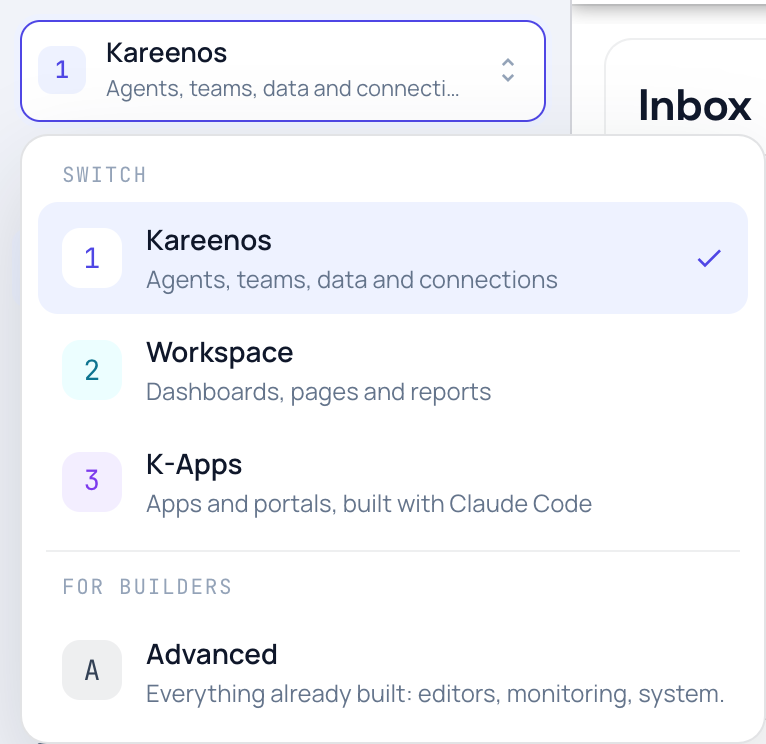
| Level | What it is for | What you find there |
|---|---|---|
| 1 · Kareenos | Run your operation | New Task, Inbox, AI Agents, Data Sheets, Documents, Marketplace, Connections, Location, Teams |
| 2 · Workspace | See it | Dashboard, Pages, Reports, Widgets |
| 3 · K-Apps | Ship your own apps | Apps, Embeds, Publish to Marketplace, Claude Code Setup |
Start in level 1. Many businesses run there for weeks, often for good: agents answer on WhatsApp and email, keep the data sheets current, and hand anything that needs a person to the team's Inbox. When you want to see the operation as dashboards and screens, open level 2. When you want an app of your own for customers or staff, open level 3. All three are there from the first day.
Builders also have Advanced: the editors, monitoring and system pages behind everything the Super Agent builds. It is not a level you climb. It is where you look when you want to inspect or tune something.
Your team is always in the loop
Agents do the routine work and people decide. Anything an agent needs from a person (an approval, a short form, a task with stops and photos) lands in the Inbox, on the web and in the myKareenos app on their phone. You decide who sees what with Teams.
What you can build
Most Kareenos customers build one of these, or a mix of them:
- Customer conversations on the channels people already use, such as WhatsApp, Telegram, Slack, email or the phone, answered by agents that know your prices and your rules.
- Job and ticket operations: work comes in, gets assigned, gets done, gets recorded.
- Field operations where people, vehicles or equipment move, with a live map and alerts when something enters or leaves an area.
- Daily and weekly reporting that a person can print or send without exporting anything by hand.
- When you are ready: dashboards and screens for your team, and apps or portals for your customers.
How it is different
A spreadsheet stores your data but does nothing on its own. A traditional application does something, but only what it was built to do, and changing it means a development project.
Kareenos sits between the two. You describe the operation, so there is no configuration screen to learn. Once the build is finished the system keeps working: agents answer customers, automations run on schedule, and the team gets what needs them. When the business changes, you describe the change rather than reopening a project plan.
Who it is for
Businesses that run operations: people doing jobs, customers to answer, records to keep, and often things that move. Service companies, logistics and delivery, field maintenance, clinics, rentals, dispatch and support teams. No technical background is assumed.
Note
Everything you build lives inside a project, which keeps its data, agents and screens separate from anything else in your account. The project you are working in is always shown in the top bar.