kareenos

Use cases

What businesses run on Kareenos.

Most businesses start with the work that arrives every day: customer messages, emails, invoices, requests from staff. Agents handle it, your records stay current, and the right team sees every case in myKareenos.

Today · handled by your agents124 handled
  • New buyer · Email

    Could you quote 200 units?

    Agent reading
  • Customer · WhatsApp

    Where is my order? I paid on Monday.

    Order #2231 found · repliedCustomer service · in myKareenos
  • Supplier · Email

    Invoice INV-5521 attached.

    Added to Invoices · sent to approveFinance · in myKareenos
  • Patient · SMS

    Can I come Thursday afternoon?

    Booked 4:15 · reminder setReception · in myKareenos
  • Caregiver · WhatsApp

    Voice note · can’t make my 6 a.m. shift

    Shift covered · Ana confirmedCare coordinators · in myKareenos

Level 1 · Run · where every business starts

Work comes in. Agents handle it. Your team always knows.

Every use case below follows the same simple path. A message or an email arrives. An agent reads it and works in your live data sheets and the tools you already use. Then every case lands in myKareenos with the right team: to approve, to step in, or to see it done. No screens to design, and nothing new for your customers to install.

  1. Step 1

    A message or an email arrives

    From a customer, a supplier or your own team

    WhatsAppEmailSMSCalls
  2. Step 2

    An agent reads it

    Understands what is asked and decides what to do

  3. Step 3

    Your live data sheets

    Orders, customers, invoices and jobs, looked up and kept current

  4. Step 4

    Your tools and systems

    Calendar, accounting, courier, payments

    MCPAPIs
  5. Step 5 · every use case

    Your team, always in the loop

    In myKareenos, on the web and the phone: to approve, to step in, or to see it done

    myKareenosWebMobile

02Customers

Customers answered on their own channel.

Questions and bookings arrive on WhatsApp, SMS and email. Agents answer them in seconds from your own records, and pass the exceptions to a person.

Online storeWhatsApp

Where is my order?

Customer

Hi, I paid on Monday and nothing has arrived. Where is my order?

The agent
  1. Finds order #2231 in your Orders sheet
  2. Checks the courier’s tracking for the parcel
  3. Replies on WhatsApp: out for delivery, arriving this afternoon
  4. KmyKareenosCustomer service
    Needs you

    Refund request · order #2231 · $48

    Every conversation is in the team’s history, and anyone can step in.

Customers are answered in seconds. Your team only sees the refunds.
Dental clinicSMS

Can I come on Thursday?

Patient

Hello, can I get a cleaning on Thursday afternoon?

The agent
  1. Checks the clinic calendar: 3:30 and 4:15 are free
  2. Offers both times by SMS and books 4:15 when the patient picks it
  3. Adds the visit to your Appointments sheet with the patient’s history
  4. KmyKareenosReception
    Needs you

    Cancellation · Thursday 4:15 · slot reopened

    Reception sees the day’s bookings and every reminder sent.

The phone rings less, and the empty slots fill themselves.

03Sales

Every enquiry answered, every quote followed up.

Buyers get prices while they are still comparing, and no quote goes quiet because someone forgot to call back.

Wholesale supplierEmail

Could you quote 200 units?

New buyer

Could you quote 200 units of the 5 L olive oil, delivered to Toronto?

The agent
  1. Reads your Price list sheet and the volume discounts
  2. Checks stock and the delivery cost in your systems
  3. Emails the quote back within minutes, in your format
  4. KmyKareenosSales
    Needs you

    New buyer · quote Q-1190 sent · follow up Friday

    Maria gets the buyer with the quote and the whole email thread.

Buyers get a price while they are still comparing suppliers.

Sales teamEvery morning

The quote nobody answered

Your Deals sheet

Quote Q-1184 was sent six days ago. No reply yet.

The agent
  1. Finds every quote with no reply after five days
  2. Sends each buyer a short, personal follow-up by email
  3. Reads the replies and updates each deal in your CRM
  4. KmyKareenosSales
    Needs you

    Buyer ready to talk · Q-1184 · call Thursday 10:00

    The rep sees every follow-up sent and every reply.

No quote goes quiet, and the pipeline stays honest without a Monday meeting.

04Money

Invoices in, payments chased.

Bills that arrive by email are entered and matched for you, and the money you are owed gets chased politely until it is paid.

Restaurant groupEmail

A supplier invoice arrives

Supplier

Please find invoice INV-5521 attached. Payment due in 30 days.

INV-5521.pdf
The agent
  1. Reads the PDF: supplier, amount, due date
  2. Adds it to your Invoices sheet and matches the purchase order
  3. Once approved, enters it in your accounting system
  4. KmyKareenosFinance
    Needs you

    Approve invoice INV-5521 · $6,240

    Finance sees every invoice read, matched and filed.

Bills are entered, matched and approved without anyone typing them.

Cleaning companyEvery morning

Three invoices are overdue

Your Invoices sheet

3 invoices are 14 days overdue.

The agent
  1. Finds the overdue invoices and who has already been reminded
  2. Sends a polite reminder on WhatsApp or email, with a payment link
  3. Marks each invoice paid the moment the payment comes in
  4. KmyKareenosFinance
    Needs you

    Dispute · invoice 1042 · “the work isn’t finished”

    Your accountant sees who was reminded, who paid and who disputes.

Money comes in sooner, and chasing is no longer anyone’s job.

05Operations

Requests turned into work that gets done.

A photo from a customer becomes a job with a technician on the way. Yesterday’s numbers arrive on your phone before the day starts.

Heating & plumbingWhatsApp

The boiler is leaking again

Customer

The boiler is leaking again. Photo attached.

photo.jpg
The agent
  1. Looks at the photo and judges it urgent
  2. Opens a job in your Jobs sheet with the customer’s address and history
  3. Books the visit in the calendar and tells the customer who is coming
  4. KmyKareenosField technicians
    Needs you

    Urgent · boiler leak · 14 Dundas St · 9:30

    The technician closes the job from the phone with photo proof, and the office sees it live.

A technician is on the way before anyone in the office picks up the phone.

Owner · three branchesEvery morning, 7:00

How did yesterday go?

Your data sheets

Yesterday’s orders, jobs and invoices are in.

The agent
  1. Reads yesterday’s orders, jobs and invoices across the branches
  2. Adds the new reviews and tomorrow’s bookings from your other tools
  3. Writes a short briefing and sends it to you on WhatsApp
  4. KmyKareenosBranch managers
    Needs you

    Branch 2 · two 1-star reviews about wait times

    Each manager gets only their own branch’s actions.

You know how yesterday went before you open the laptop.

06From your team

Your people ask. Agents do the legwork.

Your staff message the agents like a colleague, from the myKareenos app or WhatsApp. The agents do the legwork and bring in a manager for the yes.

Home care agencyWhatsApp voice note

I can’t make my shift

Caregiver · 4:48 a.m.

Voice note · Sorry, I can’t make my 6 a.m. shift today.

The agent
  1. Understands the voice note and finds the shift
  2. Looks up qualified caregivers near the client in your Staff sheet
  3. Messages three of them; the first yes gets the shift
  4. KmyKareenosCare coordinators
    For your information

    Shift covered · 6 a.m. · Ana replaces Sara

    Coordinators see every cancellation and who took the shift.

The shift is covered before sunrise, without a single phone call.

Construction companymyKareenos app

We need cement by Thursday

Site lead · site B

Need 40 bags of cement for Thursday.

The agent
  1. Checks the budget and what was already ordered for site B
  2. Once approved, places the order and books the delivery
  3. Tells the site lead the delivery time on their phone
  4. KmyKareenosProject managers
    Needs you

    Approve · 40 bags of cement · site B · $520

    The site lead sees the answer and the delivery time on their phone.

Requests stop waiting in someone’s inbox, and every approval is on the record.

Level 2 · See · Workspace · when you are ready

When it runs, see it.

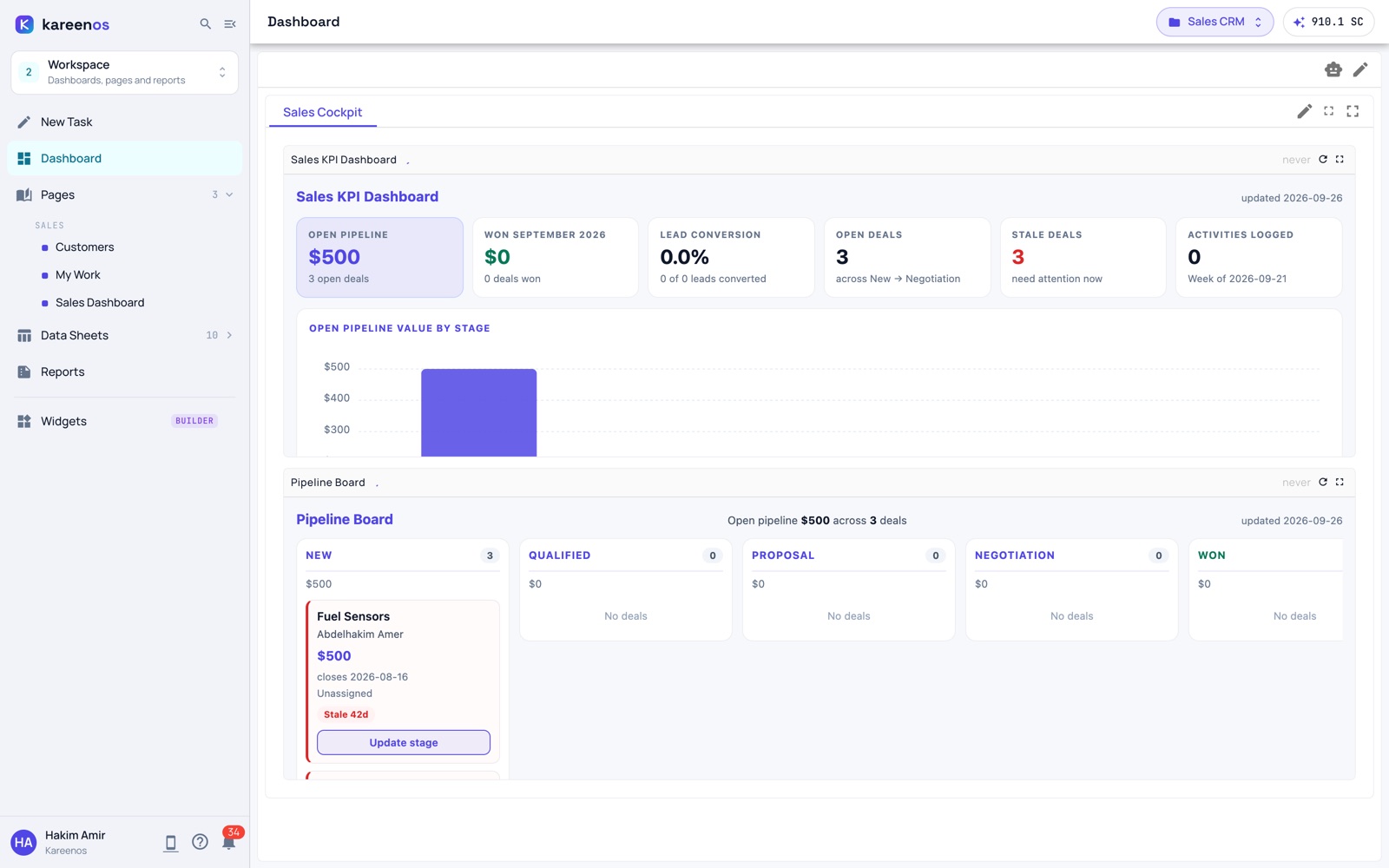
Nothing to build on day one. Later, the same sheets your agents keep become dashboards, pages and reports, built by the Super Agent when you ask for them in your own words.

Grows from the Level 1 sheets above

app.kareenos.com
A Workspace dashboard with KPI tiles and a pipeline board
Workspace · Dashboard
From your Orders and Deals sheets

A sales dashboard

Today’s orders, open quotes and who is waiting on whom, live on one screen for the manager.

From your Invoices sheet

A weekly cash report

What came in, what is owed and who is late, shared as a link with your accountant every Monday.

From your Jobs sheet

Today’s jobs, on one page

A page your dispatcher keeps open and your technicians check on their phone.

From your Orders sheet

A screen to enter new orders

Your team adds orders on one simple screen, and the agents pick each one up the moment it is saved.

Level 3 · Ship · K-Apps · when you are ready

When it works, ship it.

The same agents and sheets can power apps at your own address, for your customers or your team. Your team stays in the loop in myKareenos, exactly as in Level 1.

Runs on the Level 1 agents and sheets

app.kareenos.com
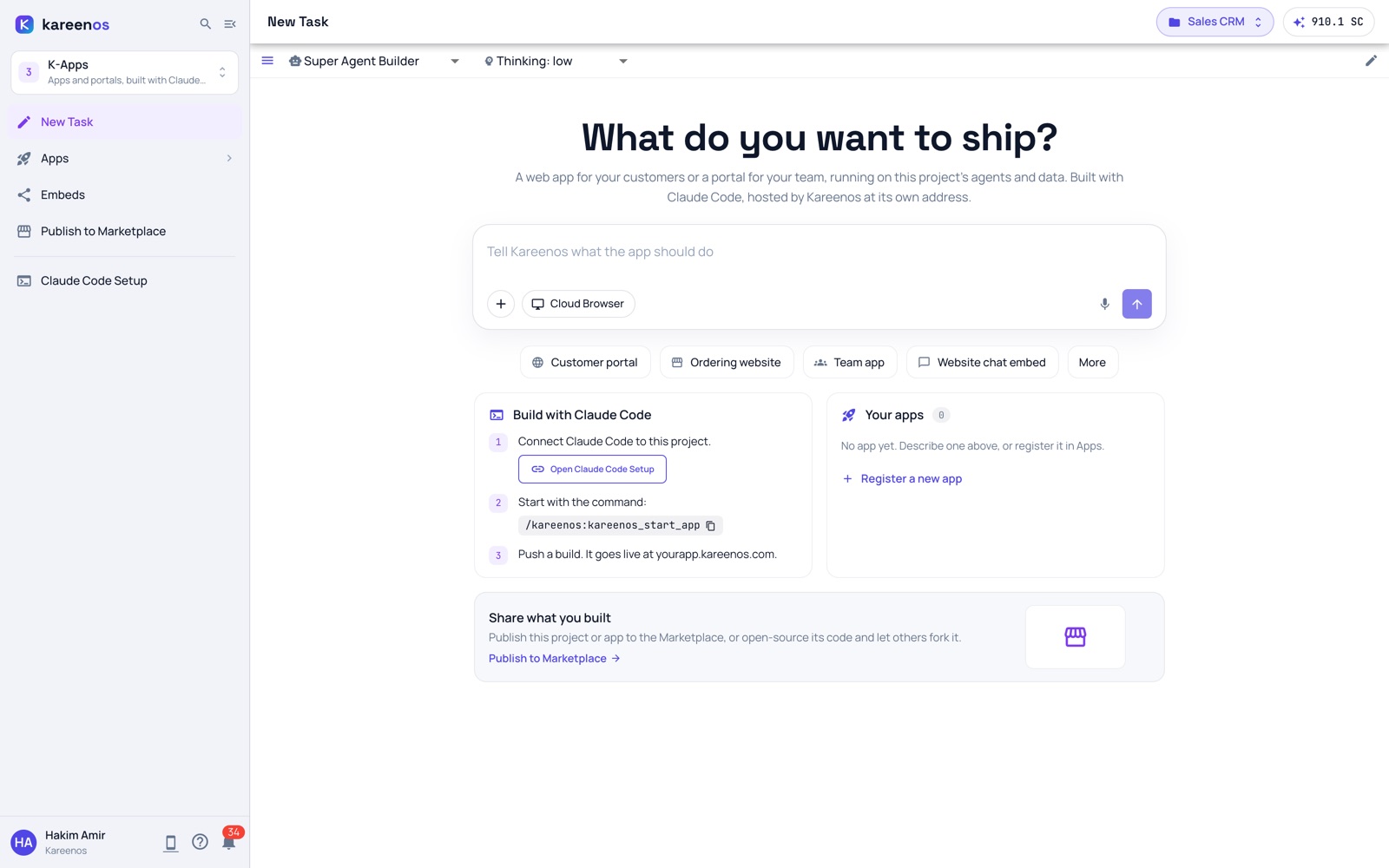
K-Apps New Task: What do you want to ship?
K-Apps · New Task

A reorder portal for trade buyers

Your buyers sign in, reorder and see their invoices. The agent that answers their emails answers here too.

Booking at your own address

Patients pick a time, and the agent that already books by SMS confirms it and sends the reminder.

Your operation in the Marketplace

Publish the whole setup, agents and sheets included, so other businesses can start from what you built.

A chat box in your online store

Shoppers ask in a chat box, and the agent that answers WhatsApp replies. Hard cases still reach your team in myKareenos.

Start with one thing that arrives every day.

Pick the message your team answers most. Describe it to the Super Agent in your own words, and an agent starts handling it with your team in the loop. Prefer to see it first? Book the 15-minute demo.